Face Beauty Makeup Camera-Self
- 4.6
- Rating
- 5.00M
- Installs
- Free
- Price
 Analysis by App-foxy
I tried Face Beauty Makeup Camera-Self as a quick beauty editor rather than treating it like a full photography studio, and that distinction matters. It is a free beauty app from Daily Aims, aimed at people who want to improve a selfie with makeup-style tools and visual effects without spending time learning a complicated editor. The app belongs to the Beauty category, carries an Everyone age rating, and works on Android devices running version 7.0 or newer.
My first impression was straightforward: this is designed for fast visual changes, not for photographers who want detailed control over every pixel. I could approach a picture with a simple goal—look a little more polished, adjust the overall appearance, and save something suitable for a profile image or casual post. That narrow purpose is also its main strength. Face Beauty Makeup Camera-Self is most useful when speed matters more than precision.
What using the camera and makeup tools feels like
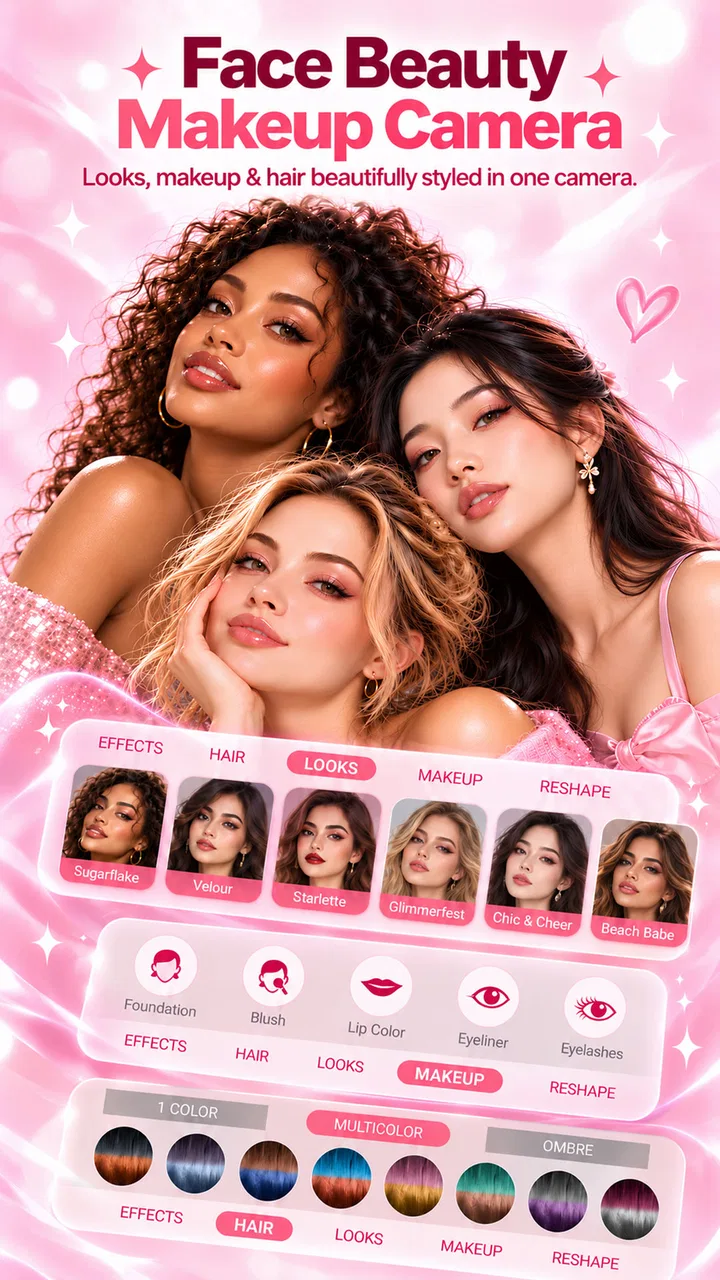
The app’s central idea is easy to understand. Start with a selfie or an image, try beauty adjustments and makeup effects, then decide whether the result still looks like you. In practice, I found that the best results came from treating the tools as small corrections instead of applying every effect at full strength. A light touch can make a portrait feel tidier; too many changes can quickly make the face look flat or artificial.
You May Also Like

 AccuWeather: Weather Radar
AccuWeather Review: A Quick, Clear Forecast for Everyday Decisions
For everyday plans, the best forecast is the one you can understand quickly. AccuWeather makes rain timing, radar, and local conditions easy to act on, with a few trade-offs.

 Hill Climb Racing
Why Hill Climb Racing Still Turns Crashes Into One More Run
A tiny car, a bumpy hill and one more upgrade: Hill Climb Racing keeps resurfacing because its simple chaos makes every near-miss feel personal.

 AliExpress - Shopping App
AliExpress Makes Global Shopping Feel Personal, but Shoppers Bear the Risk
AliExpress turns a global marketplace into a pocket-sized discovery engine. Its reach is useful, its shopping loop compelling, and its trade-offs easy to miss.

 Lords Mobile: Kingdom Wars
Lords Mobile Is a Kingdom-Building Routine, Not a Quick Match
A case-by-case verdict on the building, battles, device demands, and social commitments that make Lords Mobile rewarding for some players and exhausting for others.

 PDF Scanner app - TapScanner
TapScanner Makes Paperwork Easier to Capture, Check, and Share
TapScanner makes scanning with a phone feel less like a rescue operation and more like a dependable step in getting work done. Its capture tools are useful, though not flawless.

 Block Blast!
 Shows How Much a Puzzle Game Can Leave Out
A quiet grid game shows why puzzle players increasingly value instant clarity, repeatable skill and low-pressure play—and where the genre still needs to catch up.
More From Our News Desk
View All News


That is an important difference between a useful beauty editor and a novelty filter collection. I did not get the most convincing results by chasing the strongest effect. I got them by checking the face at normal viewing size, reducing anything that drew attention to the editing, and comparing the finished image with the original before saving it. This workflow is especially helpful when the picture is intended for a profile photo, a messaging account, or a family group where an exaggerated filter may feel out of place.
The tools are better suited to portraits than to landscapes, food shots, or general photo correction. If your image has one clearly visible face and reasonable lighting, the app’s purpose is easy to appreciate. If the picture is dark, heavily angled, crowded, or already edited several times, the result may require more patience. I would not choose it as my only editor for a mixed photo library because its focus is clearly personal appearance.
One practical habit improved my results: I made the first adjustment while looking at the whole image, then zoomed in only to check whether edges around the hair, eyes, lips, and jaw still looked believable. Beauty effects can seem fine when viewed quickly but become distracting around these areas. After checking details, I returned to the full portrait before deciding. That two-stage check is more reliable than judging the effect while zoomed in.
A realistic everyday use
Imagine taking a quick selfie before joining a video call or updating a social profile. You may not want a long editing session, and you may not need professional retouching. In that situation, I would use the app to test a restrained makeup look, compare it with the untouched image, and keep the version that still matches the lighting and expression of the original. The process is practical because it focuses on one image and one decision rather than turning a simple portrait into a design project.
For a casual event invitation, I would be more careful. A stronger effect can change the way colors appear, especially around lips, cheeks, or eyes, and that may make the image less suitable for a formal context. I would use the app for a subtle finish, then inspect the saved image on the same screen where it will be shared. A portrait that looks natural in the editor can appear more intense after being viewed as a small thumbnail.
Another useful workflow is to create two versions: one with barely visible adjustments and another with a more noticeable style. I would keep the restrained version for professional or public-facing use and reserve the stronger version for playful posts. This avoids the common mistake of editing one picture too aggressively and then having to start over when the intended audience changes.
Where it sits beside familiar alternatives
Compared with a standard phone camera, Face Beauty Makeup Camera-Self offers a more appearance-focused starting point. The normal camera is usually better when you want an honest record of a moment, accurate colors, or maximum flexibility afterward. This app is more convenient when the purpose is specifically a beauty-oriented selfie and you want to see the visual direction immediately.
Compared with a large professional photo editor, it is easier to approach but less appropriate for detailed retouching. A full editor is the better choice when you need layers, selective corrections, careful color work, or exact control over skin texture. I would also prefer a general-purpose editor for removing background distractions or preparing a product image. This app makes more sense when the face is the subject and the desired changes are cosmetic rather than technical.
There is also a trade-off against social platforms with built-in filters. Those filters are convenient if you are already posting directly, but a dedicated beauty app gives you a separate step for reviewing the image before sharing. That extra pause is valuable. It lets me decide whether the result looks natural instead of accepting the first live effect that appears on screen.
The app has attracted a broad audience, with an average rating of 4.5 from around 32 thousand ratings and over 5 million installs. Those figures suggest that the quick-selfie concept has found a substantial user base, but they do not replace personal testing. Beauty editing is subjective: someone who wants a playful transformation may enjoy settings that I would consider too strong for everyday use.
Trust starts with visible choices
When I use any camera or portrait editor, I pay attention to what the app visibly asks me to do. A camera-focused tool naturally needs access to the camera when I take a picture, and an image editor may need access to a photo I choose. That does not automatically tell me how information is handled afterward, so I avoid treating a permission prompt as proof of a broader privacy practice.
My own rule is simple: grant access only when I am ready to use the related function, and decline anything that is not necessary for the task in front of me. If I am editing one existing picture, I prefer selecting that picture rather than giving an app wider access to my entire library when the operating system offers a narrower choice. This keeps the action limited to the image I actually intend to edit.
I also look for clear user-facing controls before importing a personal portrait. The most important questions are practical ones: can I choose the image manually, can I stop using the camera, can I leave without creating an account, and can I decide whether a finished image is saved or shared? These controls matter more to me than polished filter previews because they determine how much control remains with the user.
Face Beauty Makeup Camera-Self is free to download and use, which lowers the barrier for trying it. Free access can be convenient, but I still recommend checking the permission screen and any in-app prompts carefully instead of tapping through automatically. The Everyone rating makes it broadly accessible, yet an age label alone should not be treated as a complete explanation of privacy, storage, or sharing behavior.
Moments when I would be especially careful
I would avoid importing photographs that contain more people than necessary, particularly children, identity documents, private locations, or anything that reveals sensitive personal information. A beauty editor does not need a complicated picture to demonstrate its value. A simple, non-sensitive test selfie is enough to judge whether the effects suit you.
I would also be cautious with images taken in a workplace, school, or someone else’s home. Even if the editing itself is harmless, the photograph may contain details in the background that you did not intend to process or share. Cropping before importing is a small step, but it reduces the amount of unrelated information present in the file.
Another data-sensitive moment comes after editing. Saving an image to the device and sharing it through another service are separate decisions. I prefer to inspect the final file first, confirm that it is the version I meant to create, and then choose the sharing method myself. If an app presents a quick route to publish an image, I do not assume that the fastest route is the most private one.
I would not use a beauty editor as a place to store a personal archive. I treat it as a temporary workspace: choose one image, make the edit, save the result if I want it, and remove unnecessary copies later. That approach is useful even when an app feels trustworthy because it limits the amount of personal material involved.
How much control the user really has
The best way to keep agency with this kind of app is to make decisions in small steps. I start with a duplicate or a copy of the original, apply one effect at a time, and pause after each change. This makes it easier to identify which adjustment caused an unnatural result and prevents a long chain of edits from becoming impossible to undo mentally.
I also recommend comparing the edited and original versions under ordinary screen brightness. A dramatic effect can look appealing in a bright preview but less convincing in a normal setting. If the app provides a before-and-after view, I use it repeatedly; if not, I keep the original available in the phone’s gallery and switch between the two images manually.
For people who dislike account creation, the first thing to check is whether the app lets them perform the intended editing task without handing over more personal details than necessary. I would not create an account merely to test a basic selfie effect unless the reason is clear to me. Likewise, I would not connect a social profile just to share one finished image; saving the picture and sharing it through a service I already trust gives me more control over the audience.
The current version is 18.0.0, so I would keep the app updated through the normal store process while still reviewing changes that affect permissions or user choices. An update can improve compatibility or alter how a feature behaves, and a quick look at the permission screen after an update is a sensible habit for any camera app.
Who will enjoy it, and who should skip it
I think the app is a good fit for someone who wants a focused beauty camera, prefers quick results, and does not need a professional retouching workflow. It is also useful for beginners who find large editing suites intimidating. The narrow purpose makes experimentation approachable: you can concentrate on how a face looks rather than learn a complete set of photography tools.
It may suit users who regularly prepare profile pictures, casual selfies, or playful portraits. The strongest benefit is convenience. Instead of taking a picture with the ordinary camera, opening a separate editor, and searching through unrelated controls, you can work in a space built around facial appearance and makeup-style changes.
I would skip it if your priority is exact photographic accuracy, advanced manual correction, or a comprehensive image-management system. I would also choose a different option if you need reliable batch editing, professional color grading, background replacement, or detailed control over individual areas of a photograph. Those tasks call for a broader editor, even if it takes longer to learn.
People who are uncomfortable with camera permissions or who want strict control over every stage of image handling should take extra time before importing personal photos. The app can still be tested responsibly with a low-sensitivity image, but I would not rush into using it for private portraits simply because the download is free.
My measured verdict after using it
Face Beauty Makeup Camera-Self succeeds when I treat it as a quick, dedicated portrait tool rather than a complete photography solution. Its appeal is easy to understand: it brings beauty-oriented editing into one accessible place and removes much of the setup that can make traditional editing feel slow. For a casual selfie, that focus is genuinely convenient.
At the same time, the results depend heavily on restraint. The app cannot decide what looks appropriate for your face, your lighting, or your audience. I had to make those choices myself, and the most convincing edits were the ones I barely noticed. That is not a weakness unique to this app, but it is important to understand before expecting an automatic transformation to look natural in every situation.
My recommendation is cautious but positive. Try it with a simple, non-sensitive portrait, grant only the access needed for that task, and compare every result with the original before saving or sharing. If you want fast beauty adjustments and playful makeup effects, the free app is worth exploring. If you need professional precision or stronger privacy controls than the visible choices provide, a standard camera or a full-featured editor will be the better companion.
Daily Aims has made a focused tool for everyday selfie editing, and its broad reach reflects that straightforward purpose. I would keep it for occasional portraits rather than rely on it as my only photo app. Used selectively, with careful permission decisions and a light editing hand, it can make a quick image feel more finished without turning the process into work.
FAQs for Face Beauty Makeup Camera-Self
01What features does the Face Beauty Makeup Camera-Self offer?
The Face Beauty Makeup Camera-Self app offers a variety of features including real-time makeup effects, skin smoothing, blemish removal, and a wide range of filters. Users can also access virtual try-ons for different makeup styles, allowing them to experiment with looks before applying them in real life.
02Is the Face Beauty Makeup Camera-Self app free to use?
The app offers a free version with basic features, but to unlock premium filters and advanced editing tools, a subscription or one-time purchase may be required. Users can enjoy the core functionalities without payment, but the full experience is only available through in-app purchases.
03How user-friendly is the Face Beauty Makeup Camera-Self app?
The app is designed with user-friendliness in mind, featuring an intuitive interface that is easy to navigate. Users can quickly access tools and effects with minimal effort, making it suitable for both beginners and those experienced with photo editing apps.
04Does the app protect user privacy when accessing photos?
The Face Beauty Makeup Camera-Self app prioritizes user privacy by requesting minimal permissions. It only accesses photos and camera functionalities necessary for providing its services. It does not share personal data with third parties without user consent, ensuring a secure experience.
05Can the Face Beauty Makeup Camera-Self app be used offline?
While basic features are available offline, an internet connection is required to access online filters and updates. Users can edit photos and apply standard effects without connectivity, but for the latest features and enhancements, staying connected is recommended.
Pros
- User-friendly interface for easy editing.
- Wide variety of filters and effects.
- Real-time makeup application feature.
- High-quality photo output.
- Customizable beauty settings.
Cons
- Contains ads that may interrupt usage.
- In-app purchases for premium features.
- May require high storage space.
- Some features need internet connection.
- Limited free editing tools.

Face Beauty Makeup Camera-Self
Gallery